
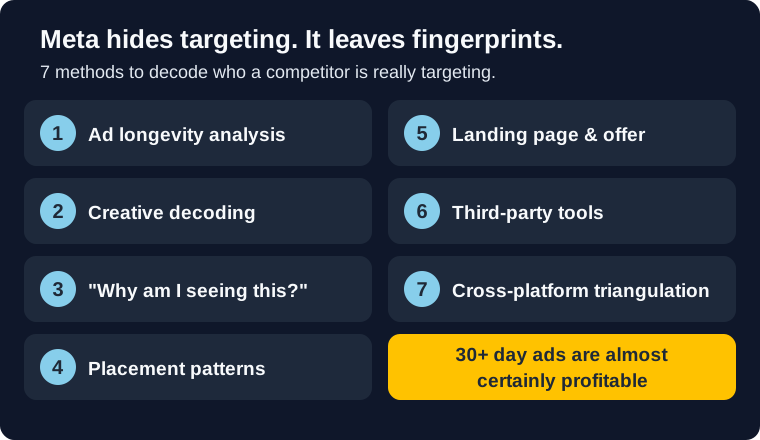
Meta Ad Library shows you every ad your competitors run. It tells you nothing about who they're targeting. That's by design. Targeting data is only visible for political and social issue ads. Commercial ads? You get creative, placement, and dates. That's it.
But targeting leaves fingerprints everywhere. The creative choices, the placements, the landing pages, how long an ad has been running. If you know where to look, you can piece together a competitor's audience strategy from what Meta does show you. If you need the broader foundation first, read our Meta Ad Library guide. We also covered how to find competitor ads in a previous guide. This one is about what to do after you find them.
These 7 methods won't give you a competitor's exact audience settings. But they'll give you targeting hypotheses worth testing, which beats burning budget on random audience guesses. That is the real win: fewer blind tests, faster learning, and a better reason for the next audience you put money behind.
Bottom line
- Ad longevity is your best signal: Ads running 30+ days are almost certainly profitable. Study those first.
- Creative decodes demographics: Models, language, price points, and lifestyle cues reveal who the ad targets.
- "Why Am I Seeing This?" is the only method that reveals actual targeting parameters (age, interests, location).
- Systematic monitoring beats random browsing: A 30-minute weekly workflow produces better intel than occasional deep dives.
- Advantage+ weakens placement analysis: Meta's algorithm-driven placement means placement data is less revealing than it was two years ago.
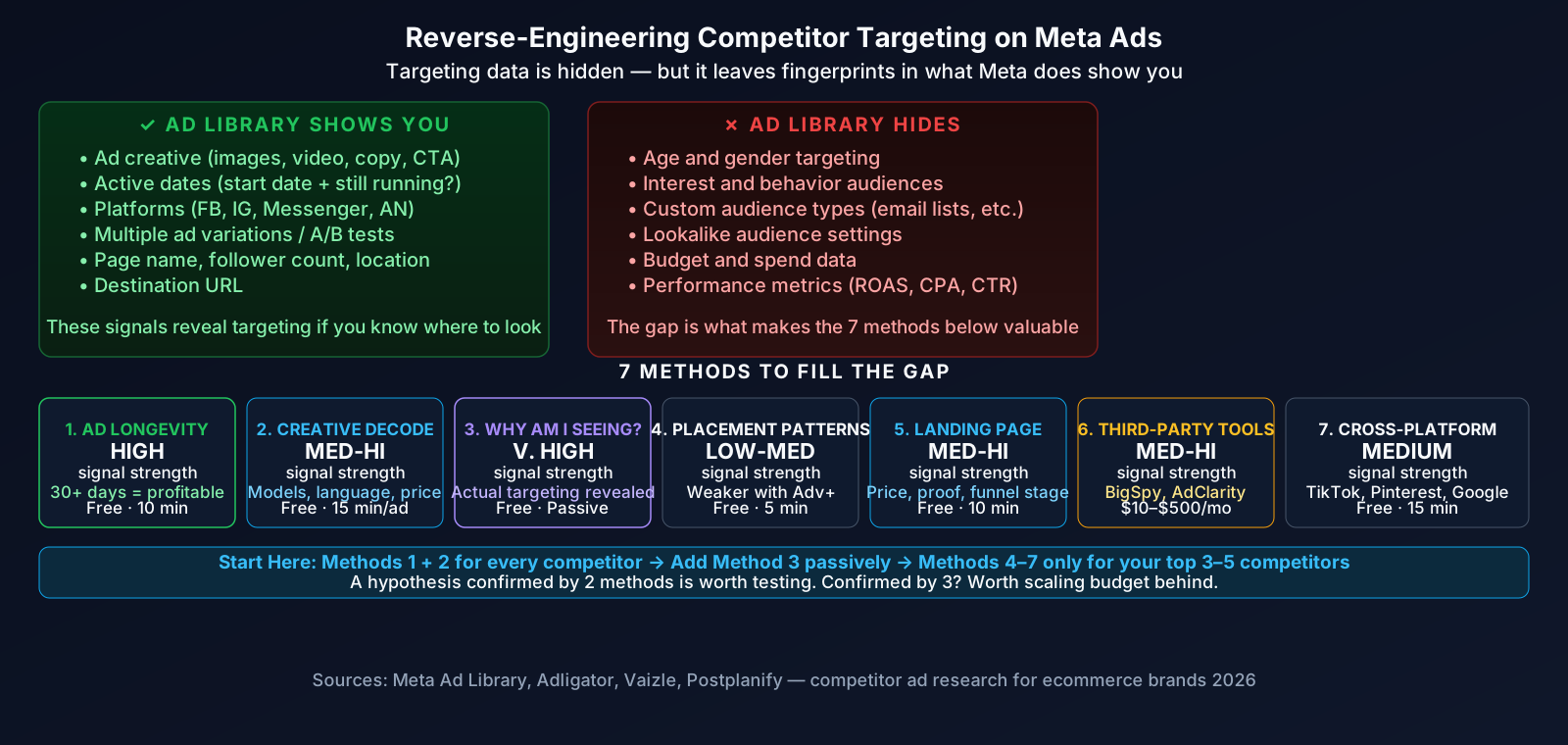
What Meta Ad Library Actually Shows (And Hides)
Before diving into methods, let's be clear about what you're working with. Meta Ad Library (Vaizle, AdLibrary.com) gives you:
- Ad creative: images, videos, copy, CTAs
- Active dates: when an ad started and whether it's still running
- Platforms: Facebook, Instagram, Messenger, Audience Network
- Multiple versions: different variations of the same ad
- Page info: advertiser name, page followers, location
What it hides for commercial ads: audience demographics, interest targeting, custom audiences, lookalike settings, budget, and performance data.
That gap is what makes the following methods valuable. Each one extracts targeting signals from the data Meta does share.
Ad Longevity Analysis
Signal strength: High | Cost: Free | Time: 10 min/competitor
This is the single most reliable proxy for profitable targeting. An ad that's been running for 30+ days is almost certainly making money. Nobody keeps unprofitable ads live for a month. According to Adligator's research on reverse-engineering winning creatives, ad longevity is the strongest indicator that a competitor has found a working audience.
How to use it:
- Search a competitor in Meta Ad Library
- Filter to ads active for 30+ days
- These are your priority targets for deeper analysis
- Note: if you see 5+ variations of the same concept, they're actively A/B testing that angle
What it tells you about targeting: Long-running ads have found their audience. The creative, copy, and offer in those ads are optimized for a specific segment. Everything in that ad (models, language, price framing) reflects the targeting that works.
Short-lived ads (under 7 days) are tests that failed. Ignore them. Focus your analysis time on the winners.
Creative Decoding
Signal strength: Medium-High | Cost: Free | Time: 15 min/ad
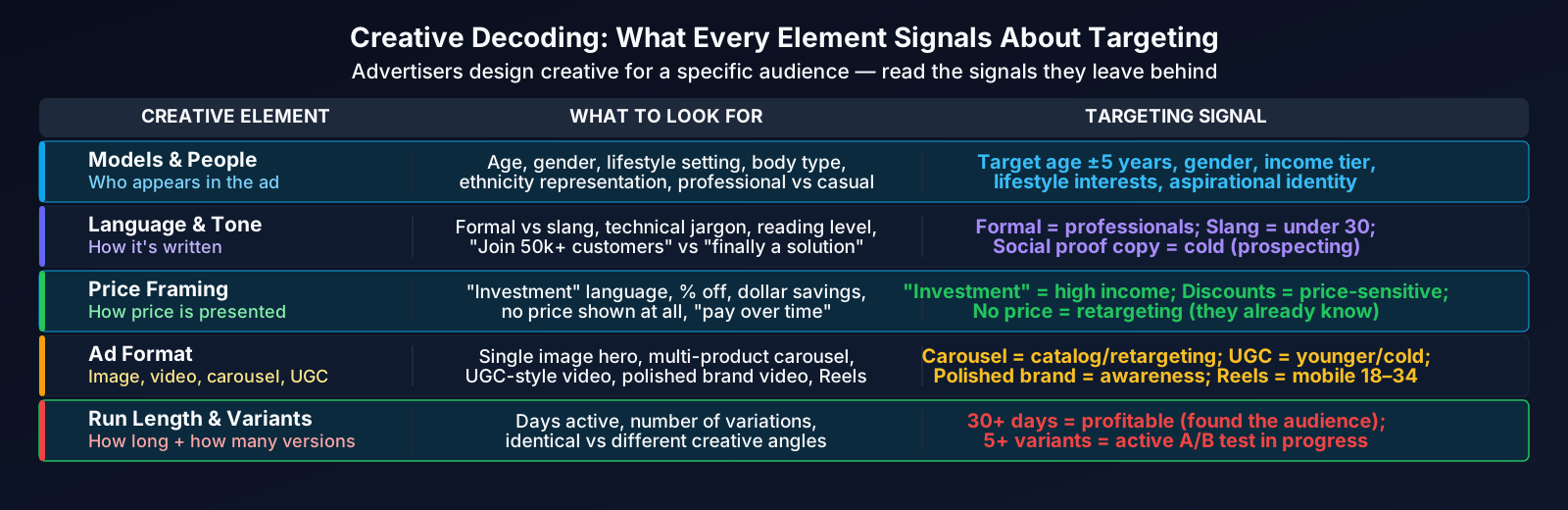
Every creative choice is a targeting signal. Advertisers (especially good ones) design creative for a specific audience. You can work backwards from what you see to figure out who they're trying to reach.
What to analyze:
- Models and people: Age range of people in the ad maps closely to target age (usually within 5-10 years). Gender, lifestyle cues, and setting all indicate demographics.
- Language and tone: Formal copy targets professionals. Slang-heavy copy targets younger users. Technical jargon targets niche interests. "Join 50,000+ customers" signals they're running social proof to cold audiences.
- Price framing: "Investment" language means higher-income targeting. Discount codes and "affordable" framing mean price-sensitive audiences. No price at all often signals retargeting (the viewer already knows the price).
- Ad format: Carousel ads with multiple products suggest catalog-based targeting. Single-image hero shots suggest brand awareness. UGC-style video suggests younger audiences.
A DTC supplement brand running ads with 30-something professionals in home gyms, $89/month pricing, and "busy executives" copy is clearly targeting affluent professionals aged 28-45. That's reading what they're telling you.
If you're seeing the same creative running unchanged for months, that's either a strong evergreen winner or a brand that isn't testing enough.
"Why Am I Seeing This?" Collection
Signal strength: Very High | Cost: Free | Time: Ongoing
This is the only method that reveals actual targeting parameters. When a competitor's ad appears in your feed, tap the three dots and select "Why am I seeing this ad?" Meta will show you specifics: age range, location, interests, or whether you're on a customer list or lookalike audience.
The problem: You only see ads targeted to you. If a competitor targets women aged 18-24 and you're a 35-year-old man, you'll never see their ads organically.
How to maximize it:
- When any competitor ad appears, screenshot the "Why Am I Seeing This?" data immediately
- Log it: competitor, date, age range, location, interests, custom audience type
- Engage with competitor pages and related content to increase your chances of being served their ads
- After 4-6 weeks of collection, patterns emerge across competitors in your space
This method is passive but high-value. You can't force it to happen, but every data point you collect is gold because it's actual targeting, not inference.
Placement Pattern Analysis
Signal strength: Low-Medium | Cost: Free | Time: 5 min/competitor
Where an ad runs tells you something about who it targets. Instagram Reels skews younger and mobile-first. Facebook Feed reaches a broader, slightly older audience. Stories work for urgency-driven offers. Messenger usually means retargeting.
Caveat: Advantage+ placements (Meta's algorithm-driven distribution) now dominate most ad accounts. When a competitor uses Advantage+, their ads appear across all placements automatically based on where Meta finds the cheapest conversions. This makes placement analysis less reliable than it was in 2023-2024. If you see a competitor's ads evenly spread across Feed, Stories, and Reels, they're probably on Advantage+, and the placement distribution tells you more about Meta's algorithm than about the advertiser's targeting intent.
When placement analysis still works: If a competitor runs exclusively on Instagram (zero Facebook presence), that's a deliberate choice indicating a younger, visually-driven target audience. Heavy Messenger placement suggests retargeting warm audiences. These strong patterns still hold.
Landing Page & Offer Reverse Engineering
Signal strength: Medium-High | Cost: Free | Time: 10 min/competitor
Click the ad's destination URL. The landing page tells you things the ad can't.
What to look for:
- Pricing and offers: Free shipping thresholds, bundle deals, and discount codes reveal price sensitivity assumptions about the target audience
- Social proof: "Trusted by 10,000 moms" or "Used by Fortune 500 CMOs" makes the target audience explicit
- Pixel and tracking: If you see Facebook Pixel, Google Analytics, and TikTok Pixel all firing, the brand is running a full-funnel strategy across platforms
- Retargeting behavior: Visit a competitor's landing page, then watch your feeds for the next 48 hours. The retargeting ads that follow reveal their funnel structure and secondary messaging
- Geographic clues: Currency shown, shipping restrictions, and localized offers reveal geographic targeting
Landing pages also reveal funnel stage. A long-form page with FAQs and testimonials targets cold audiences. A short page with "Welcome back" messaging is retargeting. Pair this with your cost benchmarks to estimate what they're spending to send traffic there.
Third-Party Tools
Signal strength: Medium-High | Cost: $10-$500/mo | Time: Varies
Third-party tools accelerate research and surface data you'd miss manually. They don't reveal actual targeting (Meta doesn't share that with anyone), but they automate the analysis methods above. Postplanify's 2026 guide covers several options worth considering.
Worth evaluating:
- BigSpy ($10-$99/mo): Large ad creative database, trending ads, basic performance estimates. Good for ecommerce brands.
- AdClarity/Semrush ($119-$449/mo): Estimated spend, impression data, placement breakdowns. Better for agencies managing multiple clients.
- Meta Ad Library API (free): Programmatic access to Ad Library data. Requires technical resources but lets you automate weekly competitor monitoring at scale.
Where the line sits: If you're spending under $5k/month on ads, free methods (1-5) are enough. Paid tools start making sense at $10k+/month ad spend or when you're an agency managing 5+ clients. The time savings alone justify the cost at that scale. For a full breakdown of features, pricing, and what each tool actually does, see our ranked list of the best Meta ads competitor tracking and spy tools.
Cross-Platform Triangulation
Signal strength: Medium | Cost: Free | Time: 15 min/competitor
Where else a competitor advertises reveals their audience strategy. Check their presence on TikTok (Creative Center), Pinterest (Ads Library), and Google (Ads Transparency Center).
What platform choices tell you:
- Meta + TikTok: Targeting younger audiences (18-30), mobile-first, entertainment-driven
- Meta + Pinterest: Targeting women 25-45, visual/discovery-oriented, longer purchase consideration
- Meta + Google Search: Running full-funnel (Meta for awareness, Google for intent capture). Higher budget, more sophisticated operation.
- Meta only: Either focused strategy or limited budget. Check if their creative is platform-optimized or just repurposed.
A competitor running identical creative across Meta, TikTok, and Pinterest is casting a wide net. A competitor with platform-specific creative for each channel has a more targeted, segmented approach. The latter usually means better audience research behind their campaigns.
Method Comparison
| Method | Signal Strength | Cost | Time Investment | Best For |
|---|---|---|---|---|
| 1. Ad Longevity | High | Free | 10 min | Everyone (start here) |
| 2. Creative Decoding | Medium-High | Free | 15 min/ad | All brands |
| 3. "Why Am I Seeing This?" | Very High | Free | Ongoing | All brands (passive collection) |
| 4. Placement Patterns | Low-Medium | Free | 5 min | Less useful with Advantage+ |
| 5. Landing Page Analysis | Medium-High | Free | 10 min | Ecommerce brands |
| 6. Third-Party Tools | Medium-High | $10-$500/mo | Varies | Agencies, $10k+/mo spenders |
| 7. Cross-Platform | Medium | Free | 15 min | Multi-channel brands |
Start with Methods 1 and 2 for every competitor. Add Method 3 data as it comes in passively. Only invest time in Methods 4-7 for your top 3-5 competitors. A targeting hypothesis confirmed by two methods is worth testing. One confirmed by three is worth scaling budget behind.
The 30-Minute Weekly Workflow
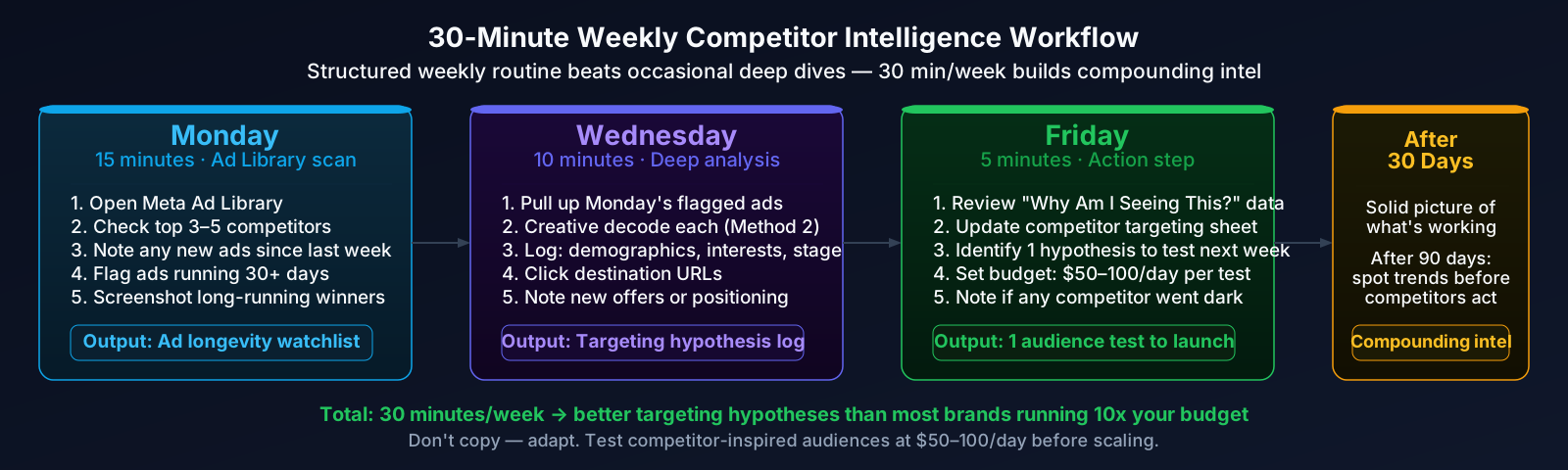
Random competitor browsing is a time sink. A structured weekly workflow produces better intel in less time. Adligator's weekly workflow guide recommends a similar systematic approach. Here's a version optimized for targeting analysis:
Monday (15 minutes): - Open Meta Ad Library. Check your top 3-5 competitors. - Note any new ads launched since last week. - Flag ads that have been running 30+ days (these are your analysis priorities). - Screenshot any new long-running ads.
Wednesday (10 minutes): - Analyze the flagged long-running ads using Method 2 (creative decoding). - Log findings: inferred demographics, interests, funnel stage. - Check landing pages for any new offers or positioning changes.
Friday (5 minutes): - Review any "Why Am I Seeing This?" data collected during the week. - Update your competitor targeting spreadsheet. - Identify one targeting hypothesis to test in your own campaigns next week.
That's 30 minutes per week. After a month, you'll have a solid picture of what's working in your space. After three months, you'll spot trends and shifts before your competitors announce them.
Don't copy. Adapt. Reverse-engineering competitor targeting gives you hypotheses, not guarantees. A targeting strategy that works for a competitor with different brand positioning, margins, or creative assets might not work for you. Test competitor-inspired audiences at small budgets ($50-100/day) before scaling. Use your own ROAS benchmarks and attribution data to evaluate results, not just surface metrics like CPC.
Stop guessing at competitor strategy.
Browse a finished competitor report on a real brand: creative patterns, hook themes, and the audience signals you can infer from what's running. Free to browse, no login.
See Sample ReportsWhat to remember
-
Ad longevity is your strongest signal. Ads running 30+ days are profitable. Focus your analysis there and ignore short-lived tests.
-
Creative decoding reveals targeting for free. Models, language, pricing, and format choices tell you who the ad is built for. No tools required.
-
"Why Am I Seeing This?" gives actual targeting data. It's the only method that shows real parameters. Collect it whenever you see a competitor ad.
-
Advantage+ makes placement analysis less reliable. Most advertisers now use algorithm-driven placements, so where an ad appears says more about Meta's optimization than the advertiser's intent.
-
Systematic weekly monitoring beats random deep dives. A 30-minute weekly workflow (Adligator) produces better competitive intel than occasional hours-long research sessions.
-
Test hypotheses, don't copy blindly. Competitor targeting works for their brand, creative, and margins. Always validate with small-budget tests against your own conversion benchmarks before scaling.
Sources
- Adligator: How to Reverse-Engineer Winning Facebook Ad Creatives. Ad longevity analysis, creative pattern recognition, and competitive research frameworks.
- Adligator: How to Spy on a Competitor's Facebook Ads: Weekly Workflow. Structured 30-40 minute weekly monitoring process for systematic competitive intelligence.
- Postplanify: Meta Ads Library: Complete Research Guide (2026). Tool comparison and Ad Library research strategies.
- Vaizle: How to Use Facebook Ad Library (2026). Step-by-step Ad Library usage and filtering techniques.
- AdLibrary.com: Meta Ads Library Search & Analyze. Ad Library search capabilities and data available for commercial ads.
Targeting reverse-engineering produces hypotheses, not certainties. Always validate with your own test data before committing budget.