
You just dropped $149 on AdSpy, and it's showing you ads from three months ago. Classic.
You're running campaigns for ecommerce clients (or maybe your own brand's Meta ads), and you need to see what competitors are doing right now, not what they were testing last quarter. The expensive tools promise the world, but by the time you see an ad in their database, your competitor has already moved on to the next winning creative.
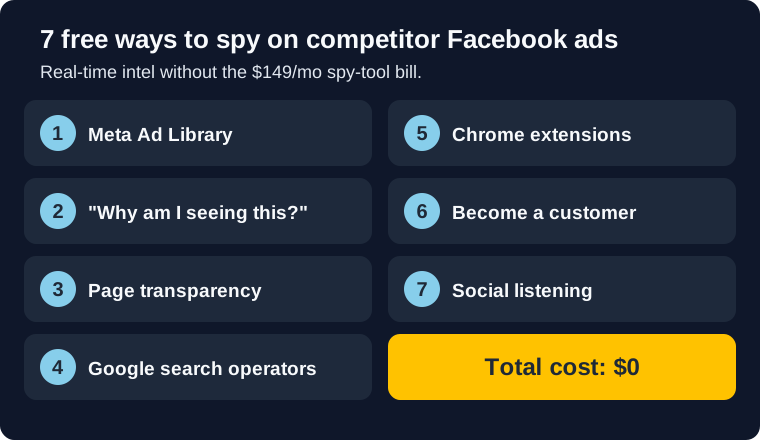
Every method below reads live data, so what you see is what's running today. All seven are free. Together they take about an hour a week for three competitors. That hour is what lets you brief your next creative round against current competitor ads instead of three-month-old ones.
If you need the broad primer first, start with our Meta Ad Library guide. This post is the more tactical version: what I actually do when I need competitor intel fast.
I've been running Meta ads for ecommerce brands for years and tried every tool out there. These 7 methods are what I actually use when I need real-time intel. No fluff, no upsells. Just what works.
Bottom line
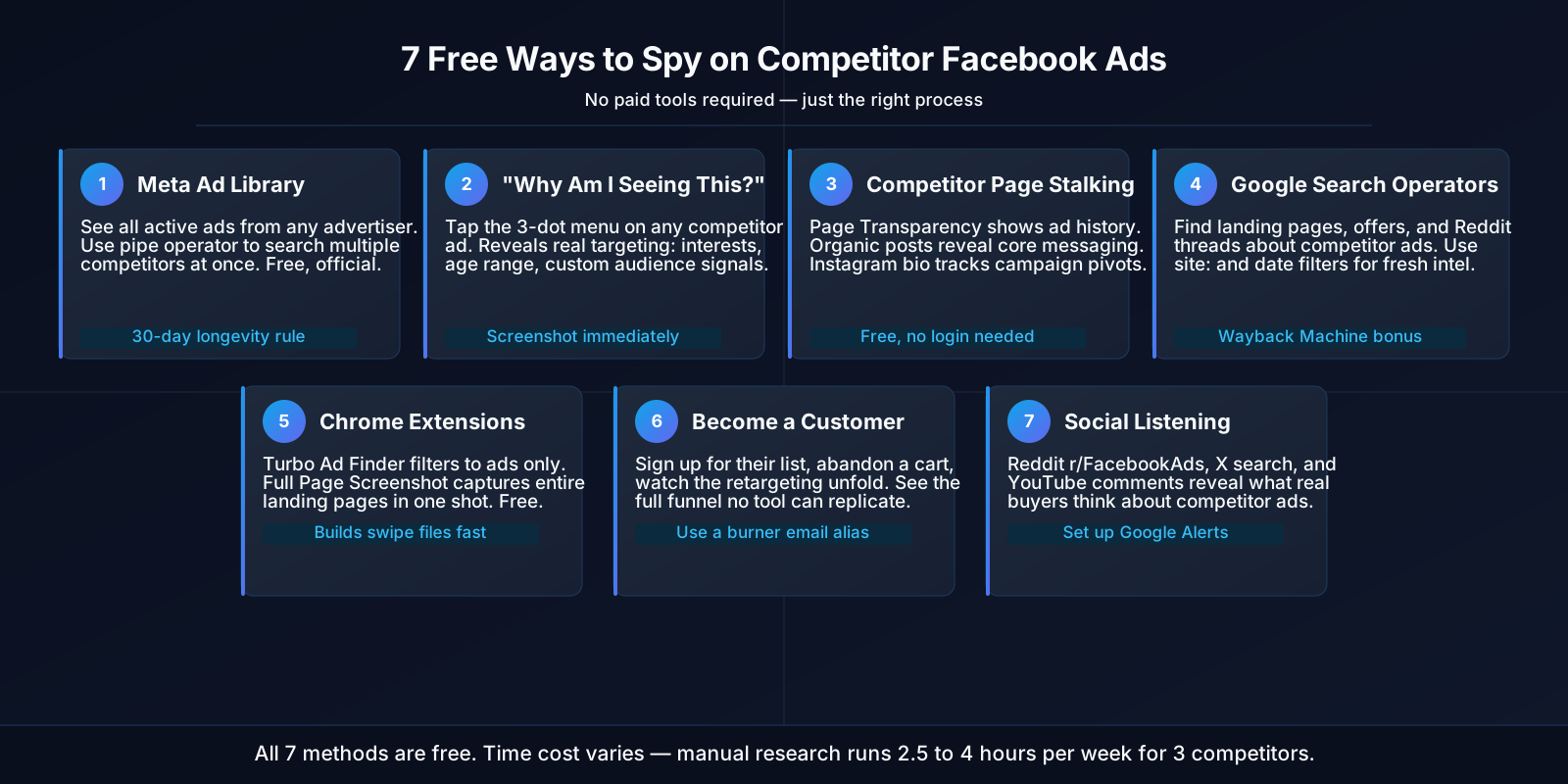
- Meta Ad Library: See all active ads from any advertiser, free and official. Use the pipe operator to search multiple competitors at once.
- "Why Am I Seeing This?": Reverse-engineer competitor targeting by checking why their ad appeared in your feed.
- Page Transparency: Track ad history, page changes, and organic messaging patterns.
- Google Search Operators: Find landing pages, offers, and community discussions about competitor ads.
- Chrome Extensions: Auto-save ads to swipe files with Turbo Ad Finder and full-page capture tools.
- Customer Journey Mapping: Experience their full funnel: ads, emails, retargeting, checkout.
- Social Listening: See what real people say about competitor ads on Reddit and X.
Why Spy on Competitor Ads?
If your campaigns are already crushing it, why waste time looking at what competitors are doing? Because what competitors run on Facebook changes constantly, and tracking it over time is how you catch their next move early.
Because your best creative idea might already be working for someone else. I've seen it dozens of times: an agency spends weeks testing angles, only to discover a competitor has been running that exact concept profitably for months. If your ads aren't converting, sometimes the fastest fix is studying what's working for competitors in your space.
For agencies managing multiple ecommerce clients, competitor research is even more valuable. When you onboard a new client in a niche you haven't worked in before, seeing what's already working gives you a head start. Instead of throwing darts in the dark, you're starting with proven angles.
Here's what I've noticed from the brands and agencies I work with:
- They cut testing time in half. Instead of guessing what might work, they start with what's already working
- They catch trends early. When a competitor launches a new product or promotion, they see it within days
- They find messaging gaps. If everyone's talking about "fast shipping" but no one mentions "sustainable packaging," that's an opening
- They spot creative fatigue early. If you see a competitor's ad everywhere, you know that angle is oversaturated
Most people do this research wrong. They spend an hour scrolling the Ad Library with no system, screenshot a few ads, and call it a day. That's procrastination disguised as work.
1 Meta Ad Library (The Official Way)
Meta Ad Library is the one tool everyone knows about but hardly anyone uses right. It's Facebook's official ad transparency database. Completely free, no account required (AdCreate). Most people use it like a tourist: browse around, take a few screenshots, leave. That's not how you get value from it.
Here's how I actually use it:
- Head to facebook.com/ads/library (bookmark this; you'll be back)
- Set your country (ads vary by region. This matters)
- Search for your competitor's exact Page name, not their brand name. Use their Facebook Page URL if you have it.
- Filter by platform. I check Instagram separately from Facebook because the creative strategy is usually different
- Sort by "Started running" date to see what they're testing right now
2026 update: You can now search multiple competitors at once using the pipe operator. Type nike|adidas|puma in the search bar to pull ads from all three pages simultaneously (AdLibrary.com). Massive time saver if you're tracking a competitive set.
What you're looking for:
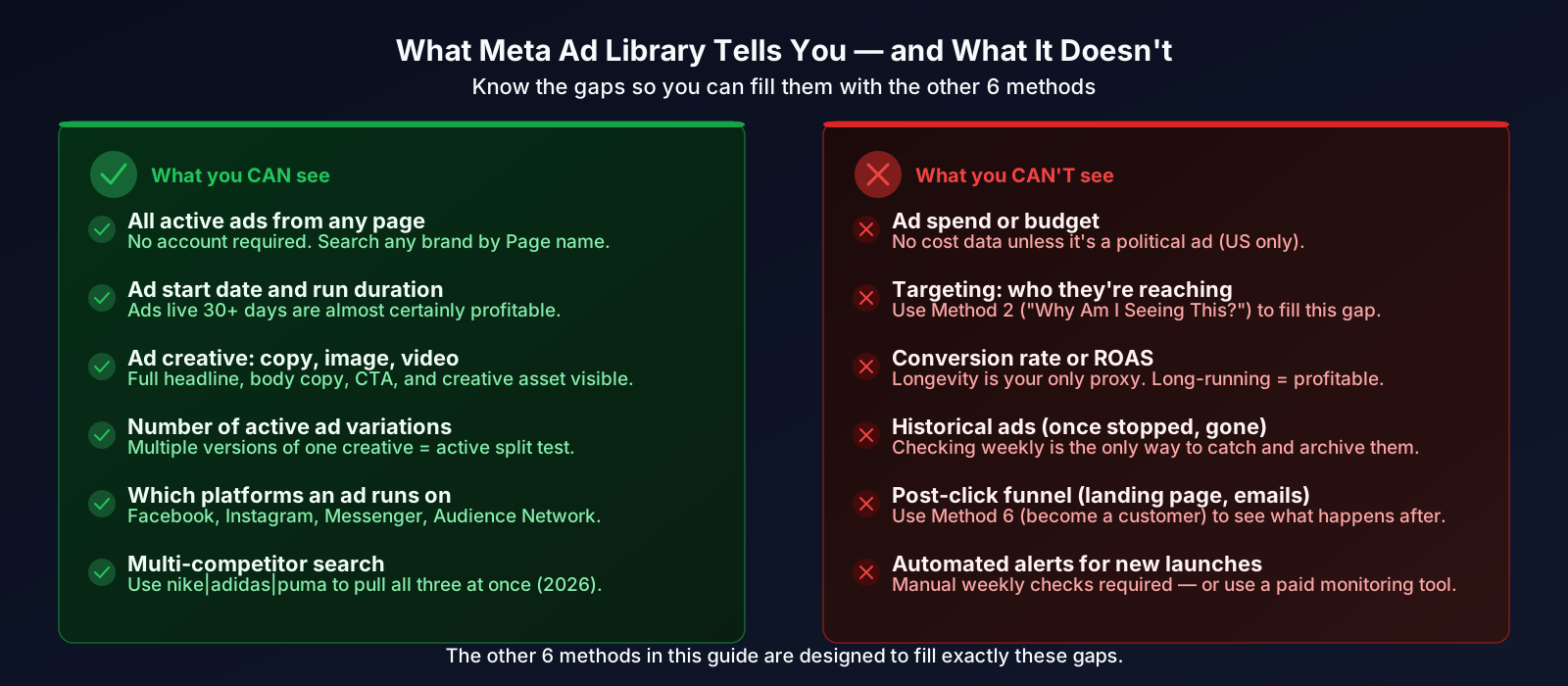
- Long-running ads: Run length is the only performance signal the Ad Library gives you, and it is an inference rather than a metric. An ad still live after 30 to 90 days is being paid for by someone watching its numbers. Past 90 days, treat it as a winner worth studying (Postplanify).
- Ad variations: When you see 5 versions of the same creative with different headlines, that's a split test. The winner will stick around.
- Copy patterns: Are they leading with price? Social proof? Pain points? This tells you what messaging resonates in that niche.
- CTAs: "Shop Now" vs "Learn More" vs "Sign Up" reveals where they are in the funnel.
Nobody keeps paying to run an ad that is losing money. The heuristic rests on advertiser behavior, not on Meta's algorithm. Meta reduces delivery to weak ads inside a campaign, but it does not switch them off, and it cannot see your margin. When I build swipe files for clients I sort by run length, start at 90 days, and work down to 30. AdLibrary.com puts its confident threshold higher still, at 60 to 180 days.
What Ad Library won't tell you:
- How much they're spending (unless it's a political ad)
- Who they're targeting (we'll cover workarounds in Method 2)
- Whether the ad is actually converting (you infer from longevity)
- Historical data (once an ad stops running, it disappears)
This is why people pay for tools: alerts and historical tracking. But if you're checking Ad Library weekly, you'll catch most of what matters.
2 The "Why Am I Seeing This?" Trick
This hack changed how I do competitor research. Most people scroll past ads without thinking, but clicking "Why am I seeing this?" gives you real targeting clues you cannot get from the Ad Library alone.
Here's how it works:
- When a competitor's ad pops up in your feed (Facebook or Instagram), hit those three dots in the corner
- Click "Why am I seeing this ad?" (usually at the bottom of the menu)
- Facebook shows you exactly why you're in their audience:
- Your age range (e.g., "25-34")
- Your location
- Interests that matched (this is the good stuff)
- Whether you're on a custom audience list
- Screenshot everything. This info disappears once you navigate away
I've built entire targeting strategies from this data. Last month, I saw a competitor's ad and discovered they were targeting "Interested in: Peloton, Lululemon, and High-intensity interval training." Way more specific than I would've guessed. I tested similar interests for a fitness client, and it crushed. For a deeper dive on extracting targeting intel, see our guide on reverse-engineering competitor targeting.
Want to see more competitor ads? Game the algorithm. Visit their website, like their Facebook page, engage with their posts, and search for their products. Meta's algorithm will think you're genuinely interested and start serving you their ads more often. It's like training a recommendation engine, except you're getting free competitive intel.
3 Competitor Page Stalking
Everyone checks the Ad Library, but smart agencies also stalk the actual Facebook Page. You'd be surprised what you can learn from organic content.
Start with Page Transparency:
- Go to their Facebook Page
- Click "About" then "Page Transparency"
- Check when the page was created. Newer pages often test more aggressively
- Look for the "Ads from this Page" section: shortcut to their Ad Library listing
Then check their organic posts:
- What messaging do they use organically? If it matches their ads, that's their core value prop.
- Which posts get the most comments? Those angles are probably working in paid too.
- How often do they post? High frequency usually correlates with bigger ad spend.
Don't forget Instagram:
- Their bio link tells you where they're driving traffic (usually a landing page or product page)
- Story highlights reveal their main selling points
- Check if they're running ads on Stories vs Feed. That tells you their audience age skew
I once discovered a competitor testing a new product launch because their Instagram bio changed from "Shop Now" to "Pre-Order Available." Two weeks before they started running ads for it. Early intel, early advantage.
4 Google Search Operators
Google search operators are cheat codes for competitor research. Most people just Google "competitor name" and call it a day, but the right operators surface landing pages, offers, and ad discussions you'd never find otherwise.
Searches I actually use:
site:competitor.com "free" OR "discount" OR "% off": Finds all their offer pages. I use this to see what promotions they're running."competitor name" facebook ad: People screenshot ads and post them online. You'll find Reddit threads, X posts, even blog posts breaking down their strategy.site:reddit.com "competitor name" ad: Reddit's r/PPC and r/FacebookAds communities love dissecting ads. I've found gold here."competitor name" landing page: Sometimes you'll find archived versions or people sharing URLs.site:competitor.com/lporsite:competitor.com/offer: Most brands use predictable URL patterns. Try /lp, /offer, /promo, /sale.
Use Google's "Tools" then "Past month" to filter for what they're doing right now, not last year.
Want to see how competitor landing pages have changed? Plug their URL into archive.org. You can see snapshots going back years. I use this to track messaging evolution: did they start with price-focused copy and switch to lifestyle? That tells you what's converting.
5 Screenshot & Save Chrome Extensions
If you're manually screenshotting every ad you see, you're doing it wrong. Free Chrome extensions do the heavy lifting.
Extensions I actually use:
- Turbo Ad Finder: Filters out organic posts so you only see ads. Massive time saver.
- Full Page Screen Capture: Captures an entire landing page in one screenshot. Way better than scrolling and taking 20 separate screenshots.
- Save to Notion / Google Drive: I use Notion for swipe files, but Google Drive works too. The key is having a system so you can find things later.
- Loom: Sometimes I'll record a quick walkthrough of a competitor's full funnel (ad to landing page to checkout). Helps me remember the flow.
My actual workflow:
- Install Turbo Ad Finder, then browse Facebook normally for 15-20 minutes. You'll see way more ads than usual.
- When something catches my eye, I screenshot it immediately. Don't overthink it. If it's interesting, save it.
- Organize by competitor name, then date. Like:
BrandX/2026-03/price-comparison-hook.jpg - Add quick notes: "Hook: Price comparison", "CTA: Shop Now", "Feels like retargeting"
- Every Friday, review the week's screenshots and look for patterns. That's when insights hit.
My swipe file has thousands of ads. When a client asks "What's working in this niche?" I can answer in 5 minutes instead of 5 hours.
6 Become a Customer (Seriously)
Most agencies skip this: actually go through a competitor's entire funnel. See what happens after you click their ad. You'll learn things Ad Library can't show you.
- What's their lead magnet?: If they're capturing emails, what are they offering? Is it valuable enough to earn the email?
- How do they email you?: I've signed up for competitor newsletters and gotten 7-email sequences that are pure gold. You can't buy that intel.
- What retargeting ads follow you?: After you visit their site, what ads appear? That's their conversion strategy in action.
- What's the checkout flow?: Upsells? Payment plans? One-click checkout? Competitive intel you can't get from the outside.
- Is the product actually good?: Sometimes I'll make a small purchase to see the unboxing, packaging, and post-purchase emails. It's research.
How to do it right:
- Create a burner email (Gmail aliases work:
yourname+competitor1@gmail.com) - Sign up for everything: newsletter, lead magnets, free trials
- Add stuff to cart but don't buy (triggers abandoned cart sequences)
- If the product is cheap enough, actually buy it. I've spent $20-30 on competitor products to see their post-purchase flow.
- Document everything. Screenshot emails, note the timing, save the retargeting ads.
Be ethical about this. Don't abuse their systems or waste customer support time. Use a real email address, and unsubscribe when you're done. This is research, not sabotage.
7 Social Listening on Reddit & X
The first six methods read the ads. This one reads the conversations around them: what real people say about competitor ads on Reddit and X.
I spend way too much time on Reddit, but it's paid off. Here's where I look:
- Reddit: r/FacebookAds and r/PPC are useful because people post screenshots and dissect strategies. I've found winning angles just from reading comments.
- X (Twitter): Search "[competitor name] ad" and you'll find people complaining, praising, or asking questions. All valuable.
- Facebook Groups: Ecommerce and marketing groups regularly share competitor ads and discuss what's working.
- YouTube Comments: If a competitor runs video ads, check the comments. People are brutally honest.
What I'm actually looking for:
- Complaints: "I keep seeing this ad" = they're retargeting hard. "This ad is misleading" = opportunity to do it better.
- Praise: "This ad actually made me buy" = study that creative closely.
- Questions: "Has anyone tried this?" = market education opportunity.
- Comparisons: "I prefer Brand X over Brand Y because..." = positioning intel.
A structured weekly cadence for this kind of listening (even 15 minutes on Fridays) compounds fast (Adligator).
I have Google Alerts for all my main competitors. Every time someone mentions "[Competitor] ad" or "[Competitor] Facebook marketing" online, I get an email. Free, takes 2 minutes to set up, and I've found some of my best intel this way. Set it to "once a day" digest so your inbox doesn't explode.
Free vs. Paid: The Real Cost of Time
These free methods cost time, which is the part the word "free" hides. And if you're running an agency or managing your own brand's ads, time has a dollar value.
Here's what I've learned doing this manually vs. using automation:
| Task | Free Method Time | With Automation |
|---|---|---|
| Check Ad Library for 5 competitors | 45-60 min/week | 0 min (automated alerts) |
| Screenshot & organize ads | 30-45 min/week | 0 min (auto-saved) |
| Click through landing pages | 20-30 min/week | 0 min (auto-crawled) |
| Analyze patterns & extract insights | 30-60 min/week | 5 min (pre-analyzed) |
| Create reports for team/clients | 30-45 min/week | 1-click export |
| Total Weekly Time | 2.5-4 hours | 5-10 minutes |
If you're billing $50+/hour (which you should be if you're running ads professionally), those "free" methods cost $125-200/week in lost productivity. That's $500-800/month. Suddenly that $149/month tool doesn't look so expensive. If you're ready to evaluate paid options, we've compared the best Meta ads competitor spy and tracking tools with honest pricing and feature breakdowns.
The hidden costs of free methods:
- No historical data: Can't see ads that stopped running last week
- No alerts: Miss competitor launches because you forgot to check
- No performance signals: Can't tell which ads are working beyond the longevity proxy
- No scale: Tracking 10+ competitors becomes a full-time job
- No attribution context: You see the ad but not the tracking and measurement behind it
When Free Methods Make Sense
- You only track 1-2 competitors occasionally
- You have more time than money (early-stage founders, freelancers)
- You're learning competitor research basics
- You need a quick one-time competitive snapshot
When You Need Something Better
- You're tracking 5+ competitors regularly
- You keep forgetting to check and missing launches
- You're spending 3+ hours/week on manual research
- You need to share reports with clients or team members
- You want to know why certain ads work, not just see them
That's 2.5 to 4 Hours a Week, Every Week
Mako Metrics reads the public Ad Library and writes up one competitor for you. You get active ad examples, format mix, run-length clues, and the copy patterns you can bring into your next creative brief. Ready within 24 hours.
See Sample ReportsMy Actual Weekly Routine
If you're going the free route (which I still do for some clients), here's the routine that works:
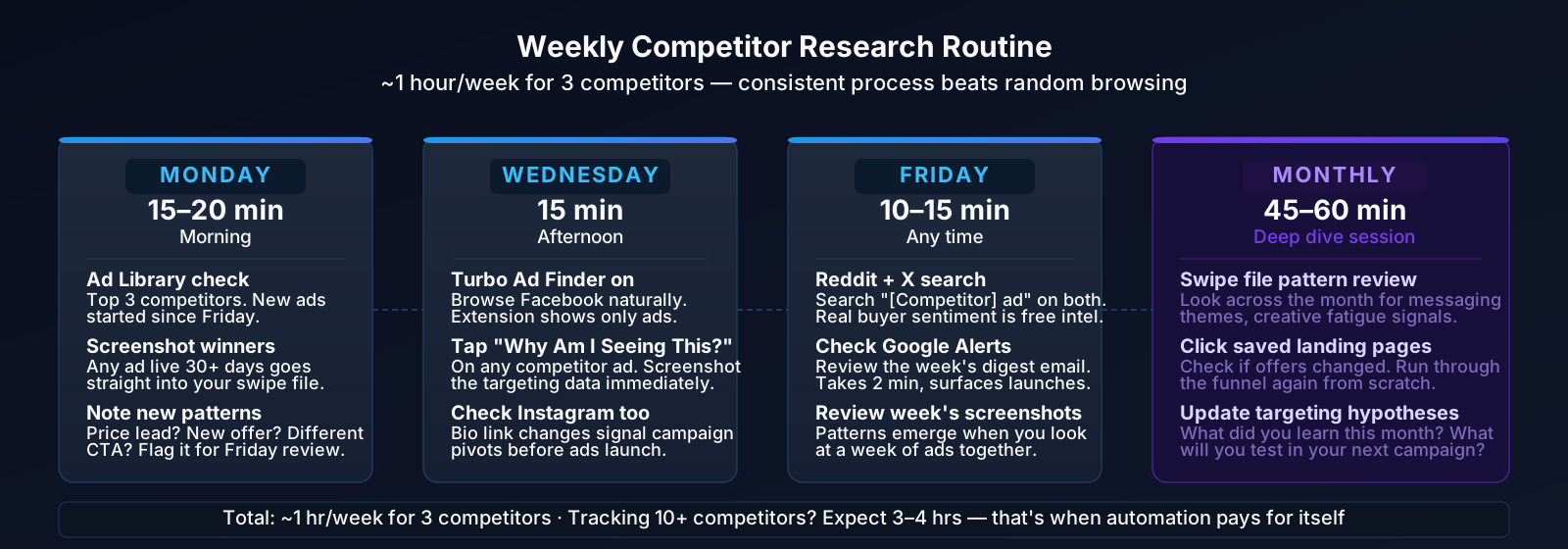
- Monday morning (15-20 min): Check Ad Library for my top 3 competitors. Look for new ads that started over the weekend. Screenshot anything interesting.
- Wednesday afternoon (15 min): Browse Facebook/Instagram with Turbo Ad Finder installed. Normal scrolling, but I see way more ads. Quick screenshots of anything that catches my eye.
- Friday (10-15 min): Reddit/X search for competitor mentions. Check Google Alerts. See if anyone's talking about what my competitors are doing.
- Once a month (45-60 min): Deep dive. Review swipe file, look for patterns, click through saved landing pages, update targeting hypotheses.
That's about an hour per week for 3 competitors. If you're tracking 10+, you're looking at 3-4 hours. At that point, automation starts paying for itself.
Free methods teach you what to look for. Paid tools make you faster at it. Start here, learn the patterns, and upgrade when your time is worth more than the subscription. The math is simple: free methods cost time, paid tools cost money.
What to remember
-
Meta Ad Library is your best free starting point. Use the pipe operator (
brand1|brand2|brand3) to search multiple competitors at once. Then sort by run length to see which creative has survived longest. -
"Why Am I Seeing This?" is the most underrated free method. It reveals actual targeting criteria (interests, demographics, custom audiences) that you can't see anywhere else.
-
Become a customer to experience their full funnel. Sign up, abandon a cart, watch the retargeting. Time-intensive but reveals conversion strategy no tool can replicate.
-
Social listening surfaces real consumer sentiment. Reddit threads and X posts tell you what's resonating and what's fatigued. Use that to find angles competitors haven't tried.
-
Free methods have real limits. No historical data, no automated alerts, no performance metrics, no scale. When research becomes a regular part of your workflow, automation pays for itself in time saved.
-
A systematic weekly routine beats random browsing. One hour per week on 3 competitors, following a consistent process, gives you 80% of what paid tools offer.
FAQ
How do you spy on competitors' Facebook ads for free?
Start with the Meta Ad Library. It's Facebook's official, no-login database of every active ad, and it's free. Pair it with the "Why am I seeing this?" trick (Method 2) to read their targeting and Page Transparency (Method 3) to watch changes over time. That combination covers most of what paid spy tools charge for.
How can I spy on my competitors' ads and know what they're targeting?
The Ad Library shows you the ad but never the audience behind it. For targeting, open one of their ads in your own feed, hit the three-dot menu, and choose "Why am I seeing this ad?" (Method 2). Meta lists the age range, location and interests that put you in that audience. Page Transparency (Method 3) then shows how long the page has been running ads and what changed along the way.
How do you spy on your competitors on Facebook?
Pick your top 3 competitors and work the weekly routine above: a Monday Ad Library check, mid-week feed browsing with Turbo Ad Finder, and a Friday social-listening pass. Sort by "Started running" so new creative surfaces first. The free ceiling is low. You get no alerts, no history once an ad stops, and it stops scaling past 5-10 competitors. Past that, the best ad intelligence tools for monitoring competitors start paying for themselves. A done-for-you report costs less than the hours.
Sources
- AdCreate. Facebook Ads Library: How to Spy on Competitor Ads (2026). No-login Ad Library walkthrough and search tips.
- AdLibrary.com. Meta Ads Library: Search & Analyze Competitor Ads. Multi-competitor search and pipe operator guide.
- AdLibrary.com. How to Spy on Competitor Ads (Guide). Run-length analysis; treats 60 to 180 days as the confident profitability signal.
- Postplanify. Meta Ads Library Research (2026). Ad Library best practices and creative analysis framework.
- Adligator. How to Spy on a Competitor's Facebook Ads: Weekly Workflow. Structured weekly monitoring system.
- Meta. Ad Library. Official transparency tool.