
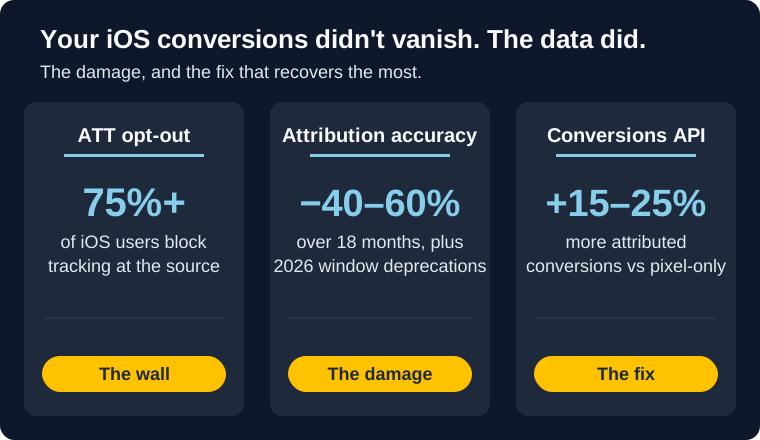
Your Meta ads conversion numbers dropped 15-30% overnight in January 2026. Not because your campaigns got worse. Because Meta deprecated 7-day view-through and 28-day view-through attribution windows (DOJO AI). Conversions that used to show up in your reports simply vanished from the data.
This is the latest hit in a trend that's been compounding since iOS 14. Over the past 18 months, attribution accuracy on iOS has declined 40-60% (Benly.ai). ATT opt-out rates now exceed 75%. iOS 17-18's Link Tracking Protection strips fbclid and UTM parameters even outside private browsing. And your ROAS numbers look worse than reality because you're only seeing a fraction of your actual conversions.
The result: ecommerce brands are making budget decisions based on incomplete data. Killing campaigns that are actually profitable. Scaling campaigns that aren't. The real risk is cutting a campaign that was carrying revenue because the report undercounted it. This guide covers the five solutions that recover the most attribution data, how to implement each one, and which combinations work best.
Bottom line
- Conversions API (CAPI) is the highest-impact fix. Brands using CAPI see 15-25% more attributed conversions than Pixel-only setups.
- AEM configuration takes 30 minutes and ensures you're capturing the right 8 iOS events. Do this first.
- Enhanced Matching uses hashed customer data to match conversions Meta's Pixel can't see. Free and easy.
- iOS 17-18 workarounds address Link Tracking Protection, which strips tracking parameters in Safari, Mail, and Messages.
- Blended metrics let you measure true performance when platform-reported ROAS is structurally undercounted.
What Broke (and What Got Worse in 2026)
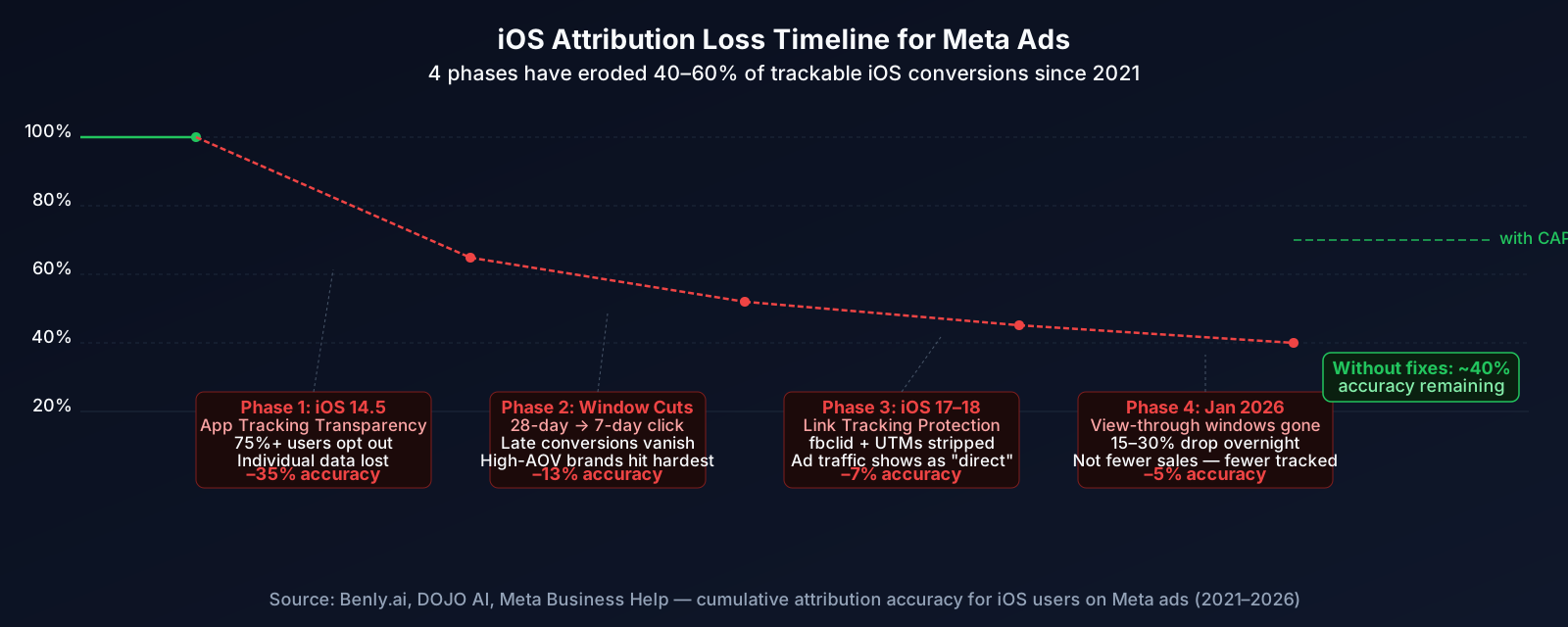
iOS attribution has been a slow bleed since 2021, with each Apple update taking another chunk out of your conversion data.
Phase 1: iOS 14.5 ATT (2021). Apple's App Tracking Transparency framework forced apps to ask permission before tracking. More than 75% of iOS users opted out. Meta lost access to individual-level conversion data for the majority of iPhone users.
Phase 2: Attribution window cuts. Meta shortened default attribution from 28-day click / 28-day view to 7-day click / 1-day view. Conversions that happened 8-28 days after an ad click disappeared from reports. For brands selling anything over $100, this wiped out a significant portion of tracked sales.
Phase 3: iOS 17-18 Link Tracking Protection (2023-2024). Safari, Mail, and Messages began stripping fbclid, gclid, and UTM parameters from URLs, not just in private browsing, but in standard browsing too (Benly.ai). Traffic that came from your Meta ads started showing up as "direct" in Google Analytics.
Phase 4: January 2026 window deprecation. Meta removed 7-day view-through and 28-day view-through attribution windows entirely (DOJO AI). Brands reported 15-30% drops in attributed conversions overnight. Not fewer actual sales, fewer tracked sales.
The cumulative effect: if 40-50% of your traffic comes from iOS (typical for DTC ecommerce), you're likely seeing only 40-60% of your true Meta-driven conversions in Ads Manager. Your actual cost per acquisition is probably much lower than what's reported.
Warning: If your ROAS has been declining but revenue hasn't, attribution loss is the likely culprit. Before cutting campaign budgets, check whether your conversion tracking is actually broken rather than your campaigns.
Solution 1: Meta Conversions API (CAPI)
Meta Conversions API: Server-Side Tracking
Impact: Highest | Setup: Medium | Cost: Free
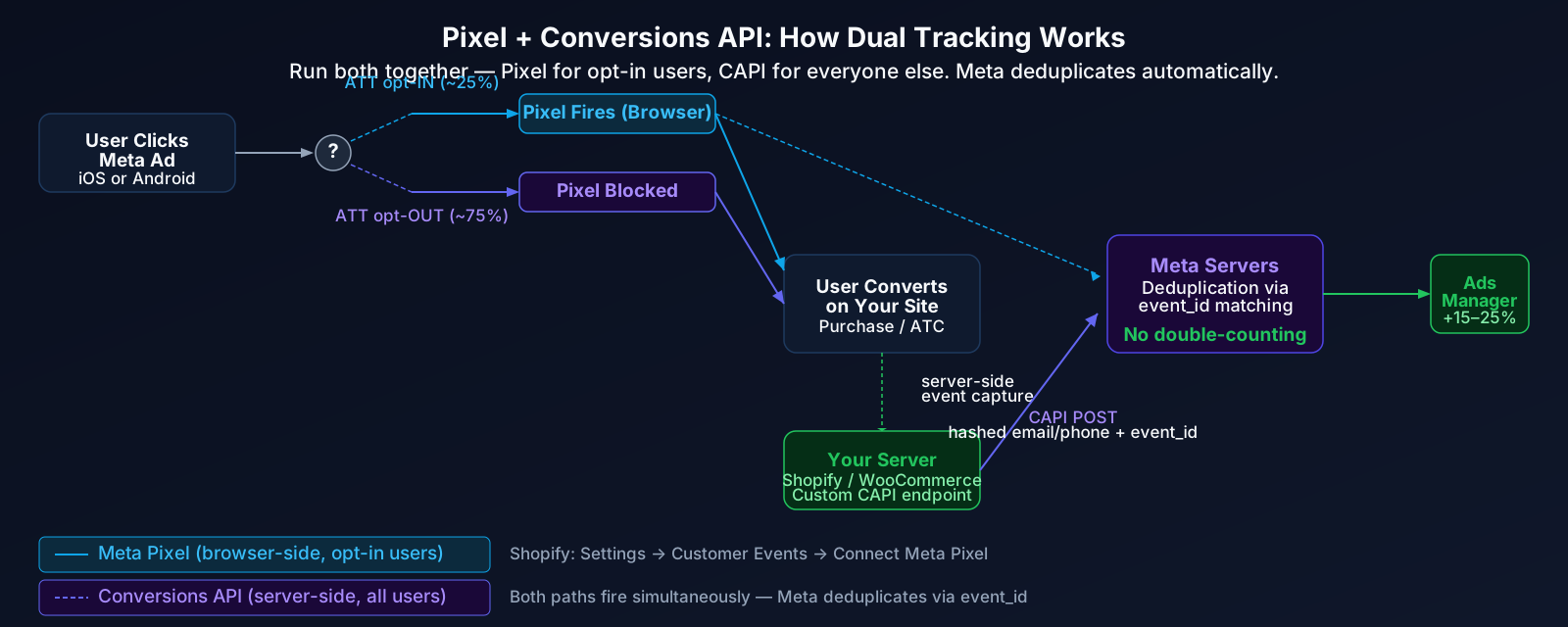
CAPI sends conversion events from your server directly to Meta's servers, bypassing every browser-side restriction Apple has introduced. It works regardless of ATT opt-out status, ad blockers, or iOS Link Tracking Protection. Brands running CAPI see 15-25% more attributed conversions than Pixel-only setups (Benly.ai).
How it works: User clicks ad → user converts on your site → your server sends hashed event data to Meta → Meta matches the conversion to the original click using event ID, customer data, or timestamp. The Pixel still fires for users who allow tracking; CAPI catches everyone else.
Setup by platform:
- Shopify: Settings → Customer events → Connect Meta → select your Pixel. Shopify handles the server integration automatically.
- WooCommerce: Install the Facebook for WooCommerce plugin → Marketing → Facebook → enable "Use Conversions API."
- Custom platforms: Use Meta's Events API endpoint (
graph.facebook.com/v21.0/{pixel-id}/events). Send POST requests withevent_name,event_time,user_data(hashed), andaction_source.
Validation: After setup, go to Events Manager → Test Events. Trigger a purchase. You should see both a Pixel event and a CAPI event fire. Meta deduplicates automatically using the event_id parameter.
Not sure which setup path fits your stack? Our full guide to setting up the Meta Conversions API compares the five setup methods and shows what a working deduplication looks like in Test Events.
Don't turn off the Pixel when you set up CAPI. Run both simultaneously. The Pixel handles real-time optimization for users who allow tracking. CAPI catches iOS opt-outs. Meta deduplicates overlapping events so nothing gets double-counted. This dual setup is what Meta explicitly recommends.
Solution 2: Aggregated Event Measurement (AEM)
Aggregated Event Measurement: iOS Event Configuration
Impact: Medium | Setup: Easy (30 min) | Cost: Free
AEM is Meta's protocol for measuring conversions from iOS users who opted out of tracking. It limits you to 8 prioritized conversion events per domain, and only the highest-priority event in a session gets reported. If you haven't configured this properly, you're leaving iOS conversion data on the table.
Recommended priority order for ecommerce:
- Purchase
- Add to Cart
- Initiate Checkout
- View Content
- Lead / Complete Registration
- Add Payment Info
- Search
- Page View (or custom event)
Setup: Events Manager → Data Sources → your Pixel → Aggregated Event Measurement → Configure Web Events → select your domain → assign priority to your 8 events → Save.
Heads up: You can only change event priorities once every 72 hours, and changes take up to 48 hours to take effect. Get the order right the first time. If you're running app campaigns alongside web, you'll also want SKAdNetwork configured in parallel (Meta, Branch.io).
Solution 3: Enhanced Matching
Enhanced Matching: Hashed Customer Data
Impact: Medium | Setup: Easy (15 min) | Cost: Free
Enhanced Matching sends hashed customer data (email, phone, name, ZIP) to Meta alongside conversion events. When the Pixel can't track a user due to iOS restrictions, Meta matches the hashed data to the person who clicked the ad. This is especially effective for ecommerce because you already collect this data at checkout.
Setup:
- Events Manager → Data Sources → your Pixel → Settings → Advanced Matching
- Enable Automatic Advanced Matching (Meta scrapes form fields on your site)
- For CAPI events, include hashed
em(email),ph(phone),fn(first name),ln(last name), andzp(ZIP) in theuser_dataobject
The more data points you send, the higher the match rate. Email alone gets you decent matching. Email + phone + name + ZIP gets you the best results. All data is SHA-256 hashed before it leaves your server.
Solution 4: iOS 17-18 Link Tracking Protection Fixes
iOS 17-18 Link Tracking Workarounds
Impact: Medium | Setup: Medium | Cost: Free to Low
Starting with iOS 17, Safari strips fbclid, gclid, and UTM parameters from URLs, even in standard (non-private) browsing. iOS 18 expanded this to Mail and Messages. This turns Meta ad traffic into "direct" traffic in your analytics, breaking both attribution and audience building.
Fix 1: Capture parameters on first page load. Use JavaScript to read UTM and fbclid from the URL immediately on landing, then store them in a first-party cookie before Safari strips them on subsequent navigations.
Fix 2: Server-side parameter preservation. When a user lands on your site, capture tracking parameters server-side (in your session or database) rather than relying on client-side cookies. Pass them to your conversion events when the user purchases.
Fix 3: Campaign-specific landing pages. Instead of relying on UTM parameters, use unique URL paths for different campaigns. yoursite.com/spring-sale instead of yoursite.com/?utm_campaign=spring-sale. You can attribute by page path regardless of parameter stripping.
Fix 4: Promo code attribution. Include unique promo codes in ad creative. Track which codes are redeemed to attribute sales back to specific campaigns.
If you've already set up Conversions API with Enhanced Matching, you're covered for the majority of iOS 17-18 attribution loss. The parameter stripping mainly hurts Pixel-only setups and Google Analytics attribution. CAPI matches conversions server-side using customer data, so it doesn't depend on fbclid surviving the browser.
Solution 5: Blended Metrics & Manual Reconciliation
Blended Metrics: Measure What Platforms Can't
Impact: High (for decision-making) | Setup: Easy | Cost: Free
Even with every technical fix in place, platform-reported attribution will remain structurally incomplete. The brands making the best decisions in 2026 supplement Meta's data with blended metrics that account for the gap.
Blended ROAS formula: Total Revenue ÷ Total Ad Spend. Ignore platform attribution entirely. If you spend $10,000 on Meta ads and your store does $40,000 in revenue, your blended ROAS is 4.0x. Compare this to Meta's reported ROAS to estimate your attribution gap.
Manual reconciliation:
- Export Meta Ads Manager conversion data for a given period
- Export actual sales from Shopify/WooCommerce for the same period
- Calculate the delta. If Meta shows 70 purchases but you had 100 total (and Meta is your primary channel), the ~30 unattributed purchases are likely your iOS dark traffic
- Apply that ratio to your ROAS and CPA calculations before making budget decisions
Incrementality testing: The gold standard. Pause Meta ads in one geo region for 2-4 weeks. Compare revenue in the paused region vs. a control region. The difference reveals Meta's true incremental contribution, regardless of what the Pixel reports.
Which Solutions Should You Implement?
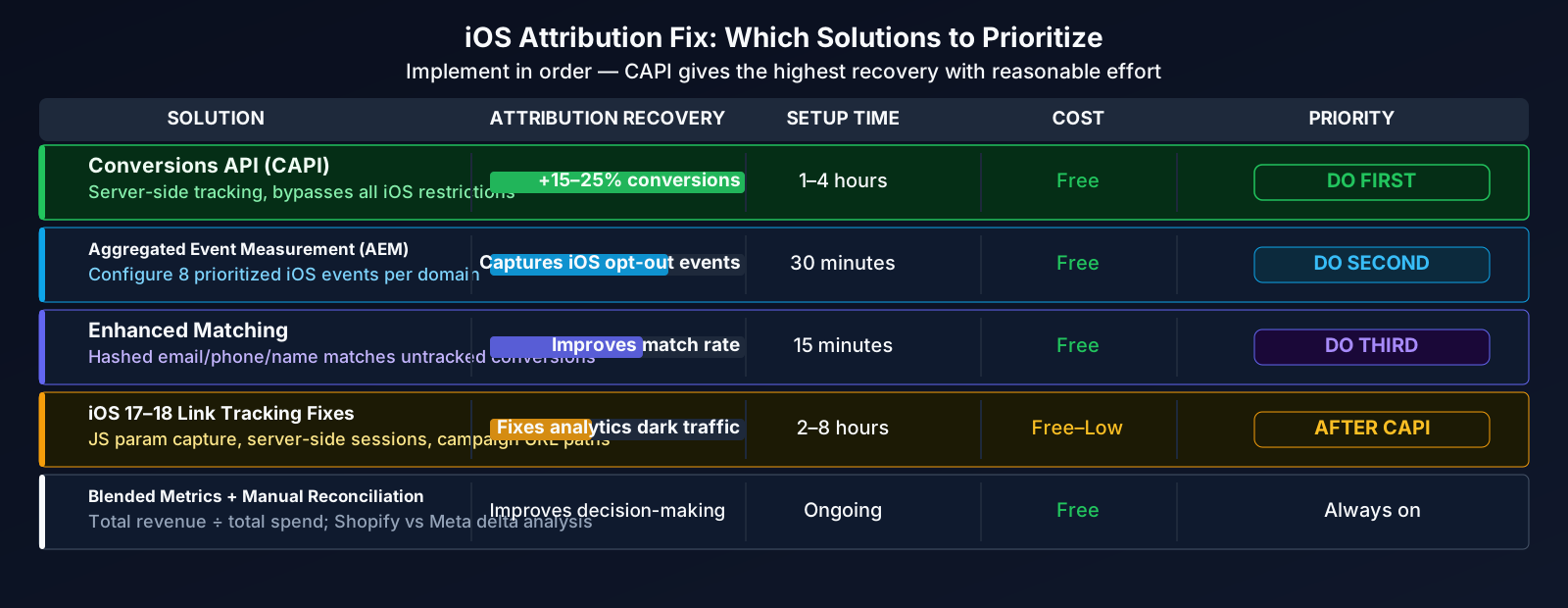
Not every fix is relevant for every brand. Here's how they stack up:
| Solution | Attribution Recovery | Setup Time | Best For |
|---|---|---|---|
| Conversions API | 15-25% more conversions | 1-4 hours | Every brand (highest priority) |
| AEM Configuration | Captures iOS opt-out events | 30 minutes | Every brand (do this first) |
| Enhanced Matching | 10-20% match rate boost | 15 minutes | Ecommerce (you already have the data) |
| iOS 17-18 Workarounds | Recovers stripped parameters | 1-2 hours | Brands with high Safari / iOS traffic |
| Blended Metrics | Full picture (not platform-dependent) | 30 minutes | Every brand spending $5k+/month |
Implementation Order
Week 1 (30 minutes): Configure AEM event priorities and enable Enhanced Matching. These are free, fast, and immediately improve data quality.
Week 2 (1-4 hours): Set up Conversions API. Shopify and WooCommerce make this straightforward. Custom platforms need developer time. Validate with Test Events in Events Manager.
Week 3 (1-2 hours): Implement iOS 17-18 workarounds if your analytics show significant "direct" traffic from likely-Meta sources. Set up first-party parameter capture.
Ongoing: Calculate blended ROAS and reconcile platform data with actual sales weekly. Build this into your full-funnel reporting so budget decisions reflect reality, not just what Meta can track.
The brands that combine CAPI + AEM + Enhanced Matching typically recover enough attribution to make confident optimization decisions. Add blended metrics on top and you've got a measurement framework that works despite Apple's restrictions.
While you fix attribution, is your creative keeping up?
Browse a finished competitor report on a real brand: their copy, strongest creatives, and format mix from the public Ad Library. Free to browse, no login.
See Sample ReportsWhat to remember
-
iOS attribution accuracy has declined 40-60% over 18 months, and January 2026's window deprecation made it worse. Your Meta-reported ROAS is almost certainly understated.
-
Conversions API is the single highest-impact fix. CAPI users see 15-25% more attributed conversions because server-side tracking bypasses every browser restriction Apple has introduced.
-
AEM + Enhanced Matching are free 30-minute wins. Configure your 8 priority events and turn on automatic Advanced Matching. There's no reason not to have both running.
-
iOS 17-18 strips tracking parameters in normal browsing, not just private mode. Capture
fbclidand UTMs on first page load, or use campaign-specific URLs and promo codes. -
Blended metrics fill the gap. Total Revenue ÷ Total Spend gives you a ROAS number that doesn't depend on platform attribution. Use it alongside Meta's data for budget decisions.
-
Don't cut campaigns based on incomplete data. If your reported ROAS dropped but revenue held steady, the problem is measurement, not performance. Reconcile Meta data with actual sales before making changes. Check our guide on why your Facebook ads aren't converting to rule out other causes.
Sources
- Benly.ai: iOS Privacy & Meta Ads 2026. ATT opt-out rates, attribution accuracy decline data, iOS 17-18 Link Tracking Protection impact.
- DOJO AI: Meta Ads Attribution 2026: Changes, Fixes. January 2026 attribution window deprecation details and reporting impact.
- Benly.ai: Meta Ads Conversions Not Tracking: Fix Guide. CAPI setup validation, event match quality diagnostics.
- Branch.io: Enable App Aggregated Event Measurement Support. AEM and SKAdNetwork configuration for app campaigns.
- Meta: SKAdNetwork for Advertisers. Official SKAdNetwork implementation documentation.